



Inspecting
The three read-only views for looking closely at one object: describe it, troubleshoot it, and see what relates to it.
Three full-screen views let you look closely at a single object without leaving
the TUI. All three are read-only, all three scroll the same way (↑ / k,
↓ / j, PgUp / PgDn, g / G), and esc returns you to the list.
Describe
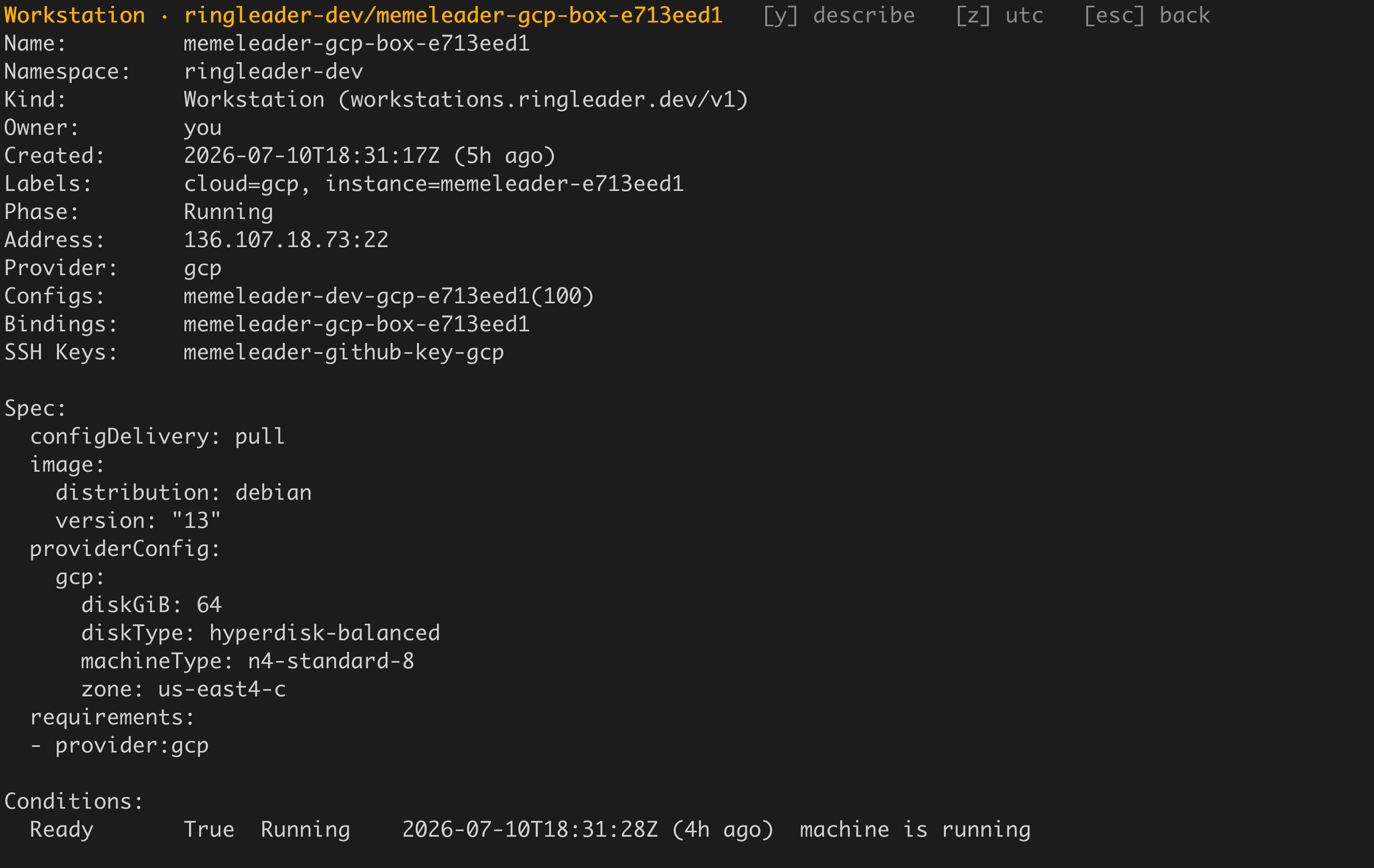
Press V (or D) on a selected row to open the describe view, a
kubectl describe-style layout of the object: its metadata, spec, conditions, and,
once an asynchronous fetch returns, its recent Events. V works on every view,
including the mixed-kind Related list. On most tabs Enter opens the describe view
too, but on the Workstations tab Enter opens an SSH shell, so V is how you
describe a workstation.
The view has three modes, and its header shows which one you are in plus the switches available on this object:
| Key | Action |
|---|---|
y | Toggle raw YAML. |
c | Toggle the resolved configuration (Workstations only). |
z | Toggle timestamps between UTC and your local time zone. |
↑ / k, ↓ / j, PgUp / PgDn, Space | Scroll. |
g / G, Home / End | Jump to the top / bottom. |
esc / q | Back to the list. |
Each mode remembers its own scroll position, so switching to the YAML and back
returns you to the same place. The header lists only the modes that work on the
object in front of you, so [c] config does not appear on a kind that has no
resolved configuration.
The z toggle is pure reformatting of already-fetched data: it re-renders the
conditions, the created line, and the Events from their stored timestamps without
going back to the API, so flipping it is instant.
The resolved configuration (c)
On a Workstation, c shows the configuration the workstation actually resolves
to, once every config layer has been merged. It is the same document
rl workstation get-resolved-configuration
prints, and it comes from the control plane that homes the workstation.
Three things are in it:
- The applied configs, each with its source and priority, so you can see which layer contributed what.
- The configuration fingerprint.
- The whole merged spec, including the parts status never carries: environment, files, scripts, sources, devtools, toolconfigs, and dotfiles.
This is the fastest way to answer “is my devtool actually going to be installed?” without leaving the TUI.
The pane fetches once, on the first c. Secret references are not resolved: a
${secret:NAME} renders verbatim, because this is the effective spec rather than
what is delivered to the workstation. If the resolve fails, the pane says so and
shows why.
Troubleshoot
Press T on a workstation to run diagnostics against it. Unlike Describe, which
renders instantly from objects already in hand, Troubleshoot opens an SSH session
to the workstation and runs a series of probes (the operating system, Docker, disk, the
login user, the agent, and the forwarded SSH agent’s environment), so it shows a brief
loading state while the gather runs.
This is the same diagnostic bundle as
rl troubleshoot <workstation> on
the command line, rendered inline. When you want to save a shareable bundle, use
the command with --diagnostics.
Note
Related objects
Press x on a workstation to open the Related view: a single mixed-kind list
of everything tied to that workstation. It gathers the WorkstationConfigs whose
selector targets the workstation, the LocalBindings pointed at it, and the
SSHKeys whose selector reaches it, and shows them together with a KIND, NAME,
and DETAIL column.
The Related view is read-only, so it has no edit, copy or delete keys. These keys work in it:
| Key | Action |
|---|---|
Enter / V | View the selected related object. |
D | Describe it. |
x | Switch to the Workstations tab, filtered to the workstations the selected object applies to. |
esc | Back to the Workstations tab. |
Use it to see what applies to a workstation without matching selectors by hand.
To go the other direction, press x on a config, binding or SSH key. The TUI
switches to the Workstations tab and filters it to the workstations that object
applies to. The object’s describe view lists the same workstations.